No-Code vs Custom Code: How to Build Your MVP
No-code can get you to market in weeks, and custom code can save you a rewrite. A decision guide for choosing between them, or combining both.
"Should I build my MVP with a no-code tool or hire developers?" It is one of the most common questions founders ask, and the internet answers it with tribal certainty. No-code evangelists say you never need to write code. Engineers say no-code collapses the moment you succeed. Both camps are describing real experiences, just at different stages.
The honest answer is that it depends on what you are trying to learn and what your product actually is. This guide gives you a way to decide, and a middle path that many teams use.
Quick definitions
- No-code means building with visual tools such as Bubble, Webflow, Glide or Airtable, without writing code.
- Low-code means visual tools with room for custom scripts and code where you need it.
- Custom code means developers build the product in a programming language and framework, giving you full control over behaviour, data and hosting.
A simple decision flow
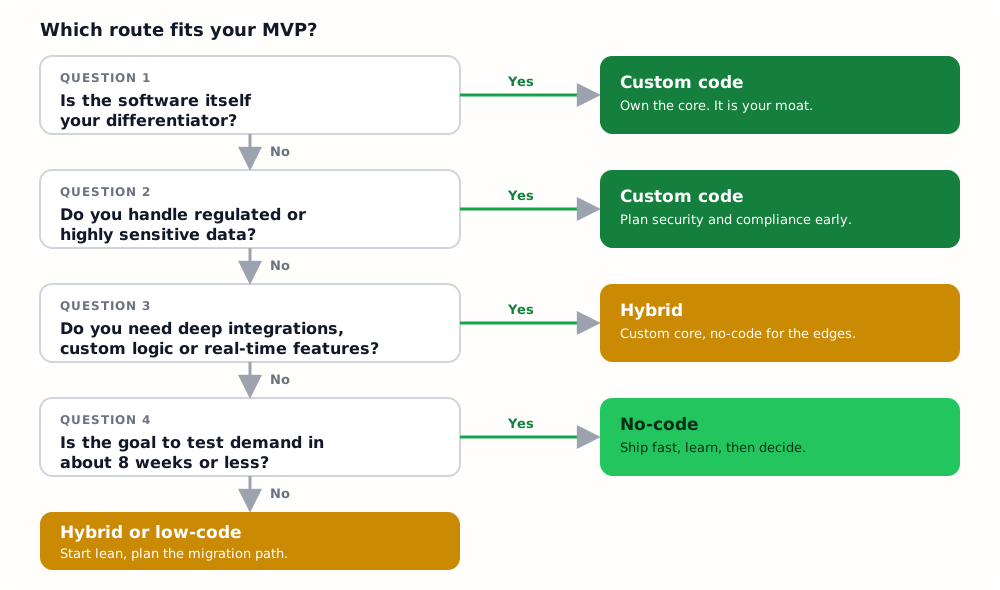
The rest of this article explains the reasoning behind each question.
When no-code is the right call
No-code shines when speed of learning matters more than technical control.
- You are testing demand, not building a moat. If the question is "will anyone want this?", a no-code product delivered in two to four weeks can answer it for a fraction of the cost.
- The product is a standard pattern. Directories, simple marketplaces, booking forms, internal tools, content sites and basic CRUD apps are well served by existing platforms.
- You will change things daily. Visual editors make copy, layout and flow changes trivial, which suits an early product that is still searching.
- Budget is tight and the goal is signal. A smaller spend lets you run several experiments before committing to one direction.
When custom code is the right call
- The software is the differentiator. If your advantage is a pricing engine, a matching algorithm, a recommendation system or a real-time experience, you want to own it.
- Strict security or compliance. Healthcare, lending, payments and children's data usually need auditability, hosting control and fine-grained access rules.
- Deep integrations or unusual logic. If you are connecting several external systems, or the rules do not fit a platform's building blocks, you will spend more time fighting the tool than building.
- Unit economics depend on cost per user. Many no-code platforms price per user, per record or per workflow. That works at 100 users and can hurt at 100,000.
- You need a native mobile experience. Offline mode, background processing and device features are hard to get from a visual builder.
Side by side
| No-code | Custom code | |
|---|---|---|
| Time to first version | Days to a few weeks | Several weeks to months |
| Upfront cost | Low | Moderate to high |
| Flexibility | Limited to the platform | Practically unlimited |
| Cost at scale | Can climb steeply | Usually flatter |
| Performance control | Limited | Full |
| Data ownership and export | Varies, check carefully | Yours by default |
| Who can change it | Non-developers | Developers |
| Risk | Platform limits and lock-in | Over-building too early |
Risks founders underestimate
Lock-in and the rewrite
You usually cannot export a no-code app's logic, only its data. If the product works, you may need to rebuild it, so treat the first version as a deliberate experiment. Budget for the rewrite and you will rarely regret the speed.
The ceiling
Every platform has limits on performance, permissions, integrations and design. The danger is not hitting a limit, it is discovering it when you have users and a deadline.
Over-engineering on the other side
Custom code carries its own trap: building scalable infrastructure for traffic you do not have. If you go custom, keep the first version small and the stack boring. Our guide to the best tech stack for an MVP in 2026 covers sensible defaults.
The hybrid approach most teams end up with
You do not have to choose one for everything. A pattern that works well for many startups is a custom core with no-code at the edges.
- Build the customer-facing product, its data and its business logic in code.
- Use no-code or off-the-shelf tools for the supporting pieces: the marketing site, internal dashboards, a lightweight CRM, onboarding forms and automations between tools.
This puts engineering effort only where it creates an advantage, and keeps everything else cheap and easy to change.
Planning an exit from no-code
If you start on no-code, plan from day one for the possibility that you will leave it.
- Keep your data in a place you can export, and test the export early.
- Document the business rules as you build them. They are the hardest thing to reconstruct later.
- Set a trigger, for example "once we hit X paying customers or Y monthly cost, we rebuild".
- Rebuild the core in code while the no-code version keeps serving customers, then switch over.
The takeaway
If your biggest unknown is demand, go with the fastest tool that gives you a real answer, which is often no-code. If your biggest unknown is whether a hard technical or regulated problem can be solved, you need code. And if you are not sure, a custom core with no-code edges is a safe compromise.
Whichever route you take, the discipline is the same: define the question, build the smallest thing that answers it and measure the result. For more on defining that question, see MVP vs prototype vs proof of concept, and for what each route costs, MVP development cost in 2026.
Tags
Keep reading