Web App vs Mobile App: Which to Build First?
Responsive web, cross-platform or native? A practical guide to choosing the right first platform for your MVP, and when to add the next one.
"Should we build a web app or a mobile app first?" is one of the first technical questions every founder faces, and it is often answered by instinct: "everyone lives on their phone, so we need an app." That instinct is sometimes right and often expensive.
The real question is not which is better. It is which gets you to real user feedback fastest, at a cost you can afford, without blocking something your product genuinely needs. This guide breaks down the options and gives you a way to decide.
Three routes, not two
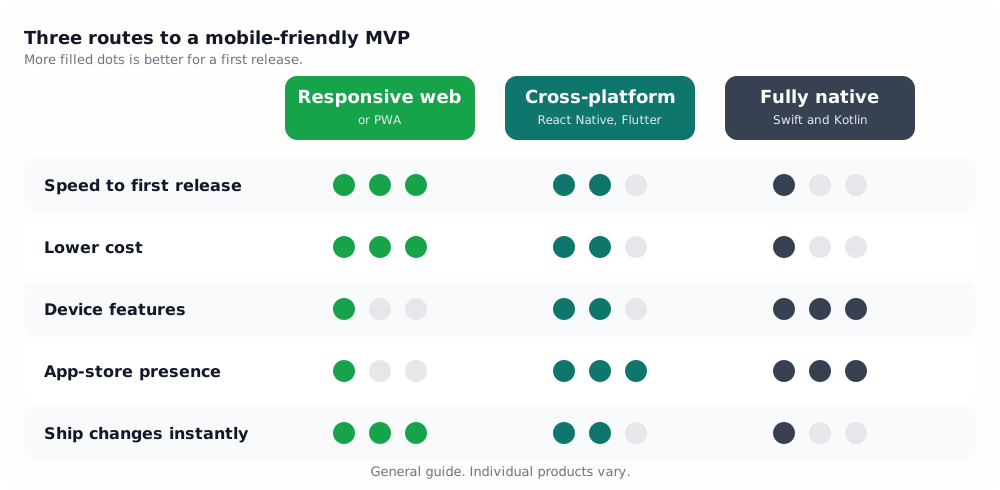
There are really three options, and the middle one is easy to miss.
- Responsive web app (or PWA). One website that works well on phones and desktops. A progressive web app, or PWA, adds an install-to-home-screen option and some offline support.
- Cross-platform mobile app. One codebase, built with a framework such as React Native or Flutter, that ships to both iOS and Android app stores.
- Fully native apps. Separate iOS (Swift) and Android (Kotlin) apps, each built with the platform's own tools.
Why web first is the default
For most early-stage products, a responsive web app is the right starting point.
- Fastest to launch. One codebase, no store approval and no waiting. You can deploy a fix in minutes.
- Lowest cost. You build and test once for the browser, rather than for two app stores and a spread of devices.
- Frictionless for users. A link is all it takes. There is nothing to download, which matters when you are asking strangers to try something new.
- Easy to share and discover. Pages can be linked, shared and found through search, which a store listing cannot match.
- Simple to change. Early products change constantly. On the web, every user gets the latest version immediately.
That speed of learning is exactly what an MVP is for. If you want the full picture on cost and timeline, see MVP development cost in 2026 and how to build an MVP in 4 weeks.
When a mobile app is the right first step
Some products genuinely need to live on the phone from day one.
- They depend on device hardware or background behaviour. Examples include continuous location tracking, Bluetooth devices, health sensors, advanced camera or AR features, and reliable background processing.
- They need strong offline use. Field-service tools, travel apps and anything used where connectivity is poor.
- They rely on habit and push notifications. A daily habit product, such as fitness, language learning or a social app, benefits from an app icon and dependable notifications.
- Distribution is the app store. If your users find new tools by searching the store, or your category is expected to be an app, being absent costs you.
- The context is "on the go". Delivery, ride-hailing, in-person services and anything used while moving.
If you tick several of these, go mobile. If you tick one or two, ask whether a web version can validate the idea first.
What a PWA can and cannot do
A PWA narrows the gap. It can be installed on the home screen, work offline for cached content, and send push notifications on many platforms. On iPhones, web push works for sites that have been added to the home screen.
Limits remain. Access to some hardware is restricted, background work is limited, and users do not find PWAs in the app stores the way they find apps. Treat a PWA as a strong option for content, commerce, dashboards and booking, and a weaker one for hardware-heavy or store-driven products.
Why cross-platform beats two native apps for an MVP
If you do need an app, building two separate native apps doubles most of the work and the cost, and it keeps two codebases in step as the product changes. A cross-platform framework lets one team ship to both stores, share most of the logic, and still reach device features through plugins.
- React Native with Expo is a natural fit if you already use React and TypeScript on the web, and it supports over-the-air updates for much of your code.
- Flutter gives a very consistent interface across devices and strong control over visuals.
Go fully native only when you need the very latest platform features, top-tier performance (for example, intensive graphics) or deep operating-system integration. Our tech stack guide covers these choices in more detail.
The app store reality check
Mobile launches carry overheads that web launches do not.
- Developer accounts. Apple charges an annual fee and Google a one-time fee at the time of writing. Check current prices, and set accounts up in your own name early.
- Review time. Each release goes through a review that can add days, and rejections for policy reasons happen.
- Slower fixes. A bug on the web is fixed once. A bug in an app may need a new build and a review, and users have to update.
- More testing. You will test across operating-system versions, screen sizes and device makers.
- Platform split. Which platform matters first depends on your market. In some regions, such as India, Android is dominant, while others lean towards iPhone. Look at your audience before choosing.
Side by side
| Responsive web / PWA | Cross-platform app | Native apps | |
|---|---|---|---|
| Codebases | 1 | 1 | 2 |
| Time to first release | Shortest | Medium | Longest |
| Release process | Deploy anytime | Store review, some over-the-air updates | Store review |
| Device access | Limited | Good, via plugins | Full |
| Discoverability | Search and links | App stores | App stores |
| Best for | SaaS, marketplaces, booking, content | Consumer apps, on-the-go products | Hardware, graphics, deep OS features |
A simple way to decide
- Does the core flow need hardware or background features the browser cannot provide? If yes, build mobile.
- Is the app store where your customers will find you? If yes, build mobile, using a cross-platform framework unless you have a reason not to.
- Otherwise, start with a responsive web app. Prove that people want the product, and add a mobile app once the usage data tells you it is worth it.
The step-by-step path many teams take
- Launch a responsive web app and learn from real users.
- Add PWA features such as installability and basic offline support.
- If usage shows a clear need, wrap or rebuild the experience as a cross-platform app, often reusing the same back end and much of the design.
Because your data and business logic live in the back end, the web-first work is rarely wasted when you add mobile later.
Mistakes to avoid
- Building both at once. You double the cost before you know what users want.
- Choosing native for status. "Real apps are native" is not a user need.
- Forgetting the web version. Even mobile-first products usually need a marketing site and a login page.
- Ignoring where your users are. Ask them what device they use, and when.
The takeaway
Start with the cheapest thing that lets you learn. For most products that is a responsive web app. Go mobile first only when your core experience genuinely depends on the phone, and when you do, choose a cross-platform framework before you choose two native builds.
Not sure which route fits your idea? Talk to Srutved and we will help you scope the first version.
Tags
Keep reading